> ## Documentation Index
> Fetch the complete documentation index at: https://guide.smore.im/llms.txt
> Use this file to discover all available pages before exploring further.
# 임베드
> 제작한 콘텐츠를 웹사이트에 바로 임베드할 수 있습니다. 원하는 곳에 자연스럽게 녹아들어, 더 많은 참여를 유도할 수 있어요.
 **임베드란?** 임베드(embed)는 ‘끼워 넣다’라는 의미예요. 스모어로 제작한 콘텐츠를 브랜드 홈페이지에 임베드 하면, 해당
콘텐츠를 페이지 내에서 바로 플레이 할 수 있습니다.
**임베드란?** 임베드(embed)는 ‘끼워 넣다’라는 의미예요. 스모어로 제작한 콘텐츠를 브랜드 홈페이지에 임베드 하면, 해당
콘텐츠를 페이지 내에서 바로 플레이 할 수 있습니다.
## 사용 방법
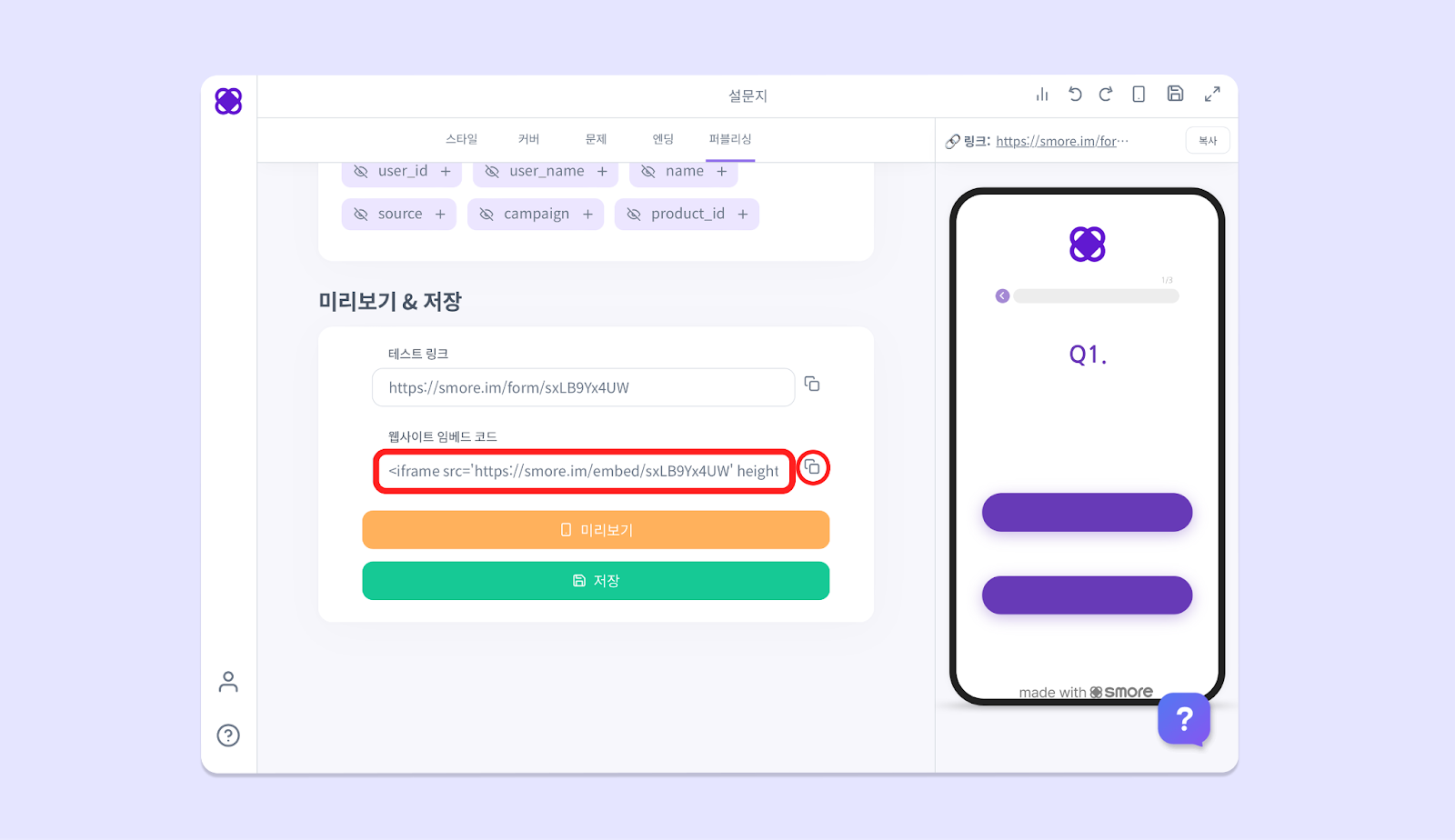
1. \[퍼블리싱] 탭으로 가서, 가장 하단으로 스크롤하면 **‘웹사이트 임베드 코드’** 가 있습니다.
2. **코드를 복사**해 주세요.
3. 임베드할 웹사이트의 **프론트엔드** 창을 켜고, **붙여 넣기** 하면 끝! 🎉
 카카오톡의 공유 API 호출 제한으로 인해, 임베드 상태에서는 카카오톡 공유 버튼이 정상적으로 나타나지 않을 수 있습니다.
임베드 상태에서도 카카오톡 공유 버튼을 사용하고 싶으시다면, 스모어 고객센터로 연락 주세요!
카카오톡의 공유 API 호출 제한으로 인해, 임베드 상태에서는 카카오톡 공유 버튼이 정상적으로 나타나지 않을 수 있습니다.
임베드 상태에서도 카카오톡 공유 버튼을 사용하고 싶으시다면, 스모어 고객센터로 연락 주세요!